Welcome to the Help Center! 👋
Welcome to the Together help center! We are here to answer your questions. If you can't find what you're looking for here, send a message to our support team at support@together.biz! For licensing questions, please contact sales@together.biz. And of course, there's also the website at together.biz with product descriptions and stories.
🚦SYSTEM STATUS at status.together.biz
Together at a glance
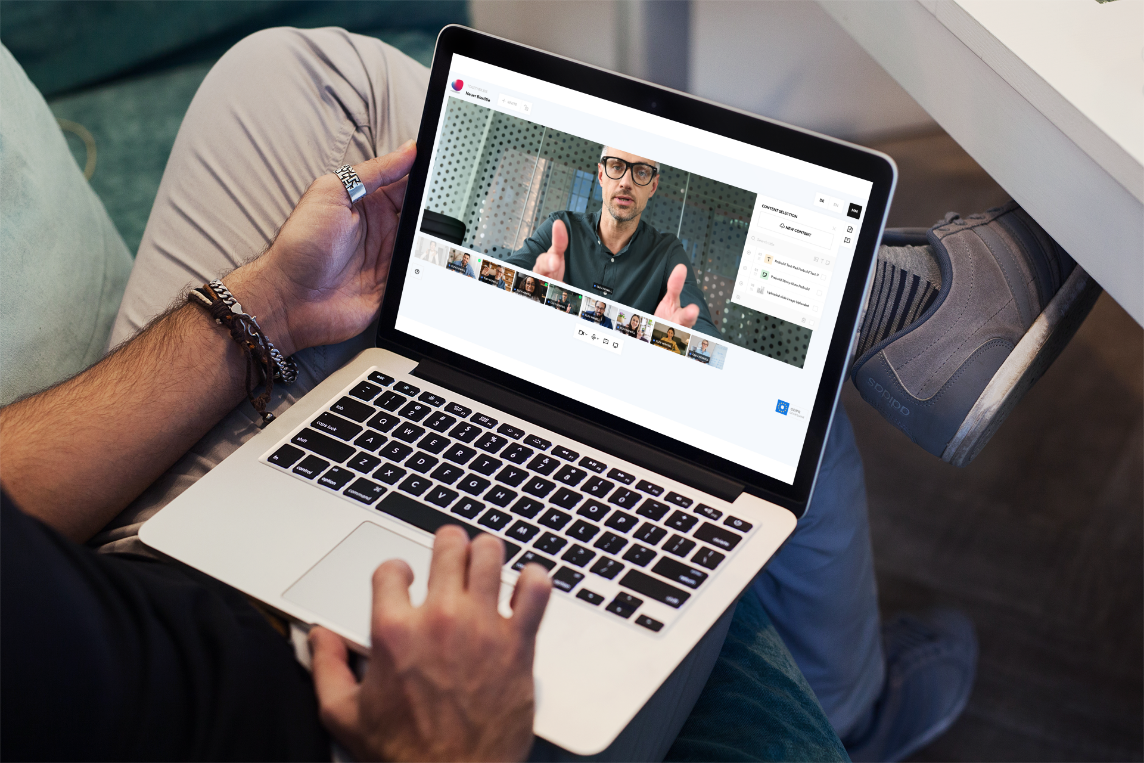
Get a quick overview of all the central functions of together.biz. Upload content, bring it to the stage, collaborate, rooms (2:24 min):
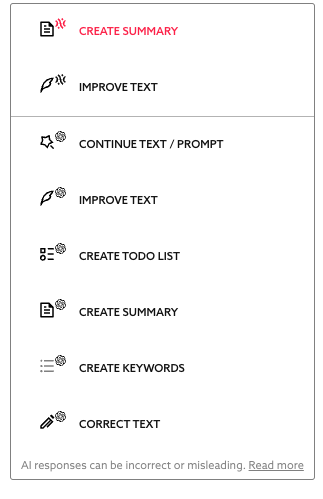
AI Features
If you´re curious about our AI features and raodmap, click here.
Working with Together
Presentations Documents Spaces Content Organization Use Cases Pricing FAQ Release Notes Roadmap👋
Together supports many types of collaboration, making it very powerful in terms of functionality. To make it extremely easy for beginners to use, we have hidden some of the advanced features. You can learn more about them here in the Help Center.
Presenting with Together
You don't want to be super interactive? This is how you can present with ease using Together: from importing to organizing content to presenting. A good starting point. (4:51 min.)
You can dive deeper into Working with Content
Working with Documents
Collaborative writing creates clarity and relieves meetings. This video shows the work in text boards and whiteboards. In the end, it discusses how to work on documents alone outside of rooms and how to use them in different rooms. (5 min.)
You can dive deeper into Working with Content
Working with multiple spaces
This video shows how to set up multiple rooms, for example, a room for a specific topic. It is important to know how to keep track of many people in the space, how to quickly switch between rooms, and even how to step aside with other people in meetings (we call this One-To-One). (3:50 min.)
After watching the video, you can further explore here Working with Multiple Spaces
Hybrid Work in a Space
In Together, teams and organizations of several hundred people can easily come together and work collectively (for work purposes or even just hanging out in a café), write together, write individually - or just be present in the same room. This video shows how it works. (3:50 Min.)
After watching the video, you can further explore here Working with Multiple Spaces
Organizing content
Keeping track of a lot of content and multiple rooms? Easy peasy: filter your views, search for text in titles, retrieve content in rooms, and assign content to multiple rooms. The best part: with just one click, take your content directly into the room where you need it. (4:33 min.)
After watching the video, you can further explore here Working with Multiple Spaces
How to use Together 📖
Organizing meetings
- Start
- Account & Login
- Videoconference
- The Stage
- Invite others
- Roles
- Chat
- Private Journal
- Personal briefcase
- Live-Pointer
Account and Billing
Working with Content
Security and Trust
- Supported Environments
- Privacy and GDPR
- Wallet-Login
- ID Verification
- Signing documents
- System Status
Working with Multiple Spaces
Philosophy and Vision
We want meetings to be shorter and more productive. Mondays are the worst day of the week and everyone has a headache in the evening.
We want meetings to only be conducted when multiple people need to coordinate on more complex topics in order to achieve results in their respective workflows. The solution is to organize communication around results and make documents central: written communication is essential for binding decisions that allow for progress to be made.
Meetings (where all participants meet and speak at the same time) are needed when:
- different opinions and attitudes clash (conflicts),
- fundamental issues need to be discussed (alignment),
- you need to get into a topic in the first place (scope),
- emotions are involved (establishing rationality), and
- when it needs to continue in a binding manner (responsibility). Of course, you can also work on simpler, operational topics in meetings (e.g. to-do discussions), which can also be done well with Together. However, we believe that the more operational a topic becomes, the more the work should be done in stretched processes over time: work together when you can. Alone, in pairs, or in the whole group. If something fundamental needs to be discussed as above, a meeting with the whole group is needed - with results, analyses, and problem outlines.
We want software that allows for a lot of freedom and doesn't force anything. Essentially, human-first. Therefore, we don't have rigid templates or mandatory requirements. You can use us as a simple video conferencing tool and then gradually learn from each other what is possible.
We tame email and endless paperwork: we write a lot, but it's always brief. Keep it simple and short!
And talk to each other as quickly as possible if there are any problems or questions. For this, we have One-To-One, Personal Rooms, and soon also Chat.
Pricing
You automatically receive our free plan. But be careful: after the trial period expires, only a single room is included. Alternatively, you can subscribe to the PRO plan with up to five rooms, payable monthly or annually. With the PRO plan, you can also purchase additional rooms.
If you need more than ten users, please email sales@together.biz. Then we'll make a deal ;-)
Fields of application 🛠
Quick Meetings
The royal road to short meetings: Preparation with an agenda that you share in advance in the room. Let others create and upload content before the meeting. It is important to always work towards results: so prepare decision templates and justifications. A result protocol should already be available at the end of the meeting and can not only remain in the room, but can also be emailed with a click.
Consulting
Prepare content for the space, create the room (e.g. with the customer's name), and set up a Textboard so you can take notes together on stage. Two features are particularly important: your customers can add slides and text boards to their briefcase and download them as PDFs. At the end of the conversation, you can email the results to your customer with one click.
Sales-Presentations
Upload your presentation, sort and name your slides. Use textboards to break up your presentation and engage in conversation. For more complex topics, have the customer prepare content beforehand or conduct a two-stage conversation: first a brief video conference with "tasks," then a second meeting. In later versions of Together, you will be able to sign contracts and make binding statements.
Learning rooms - Group Learning on steroids
Frontal presentations should be short. Learning happens through tasks, for which Textboards and Whiteboards are great tools. In addition to individual work, the focus of Together is on group work: you can quickly create new rooms, "clone" existing ones with a click, and one-to-one meetings are also possible, in which you are just one click away from a two-person conversation. Important information is provided as a handout in the collection folder, nicely formatted. Group learning on steroids. The multi-room concept is ideal for short expert discussions and supervision.
Expert talks
In education and management, it often happens that different disciplines and specialists need to come together. Together is the tool that allows experts to create text sketches with each other or make them available to the participant group - either sequentially in a meeting hour or permanently on demand in their room.
Projects with a high level of trust requirement.
Through data protection and German hosting, the foundation has been laid. However, Together goes far beyond that: with identity verification upon presentation of an official identification document, participant identities can be verified with a "blue checkmark". Access with a digital wallet (currently Metamask) not only increases security (no passwords required), but also makes usage even easier: invitation to a wallet address, and the invitee enters the room with just one click - no more searching through emails and calendars for links.
Inter-Entity-Projects
In MS Teams, there is a "Guest" page which results in giving control of the content to the other side. In Together, everyone is equal. And more than that: our concept allows sharing of content, but every content owner can take away rights from others. The ability to document decisions is also important for intercompany/entitiy projects. Where partnerships are based on weak trust, it helps to have evidence.
Large Projects
When there are many parties involved and longer discussions, multiple rooms are useful. Some meet in Room A with specific documents, others in B, while others sit in Room C to make decisions. Experts sit in the "Experts" room and so on. This is ideal for complex projects, extensive examination and legal proceedings, industrial cooperation, joint ventures, and committee work with subdivisions.
Weiteres
FAQ
You can find a general FAQ on the website in the bottom third. Here are the questions about the software:
Where can I give praise and criticism?
Please contact our founder Christoph directly at ck@together.biz.
Which browsers does Together run on?
We run on modern browsers: Chrome, Safari, Edge. There is still a small issue with Firefox, but that will be fixed soon. See more here.
Do you have an App?
No. There will eventually be an app for video conferencing features, viewing slides, and above all, recording video statements.
Is there a user community?
Yes! There is a Discord (this link may need to be refreshed frequently. Please report any issues).
How do I leave a meeting?
Exit through the door on the bottom right.

How many people can fit in a room?
Currently we have 12, but we will soon double to 24 and also do broadcasting of streams to other platforms like restream.io, then thousands can watch..
Release Notes
Roadmap
Something missing? No problem! Please send us an email to our support team at support@together.biz ✌️
Published Oct 2, 2026